Template Plus allows you to create flexible templates that automatically adapt to different types of encounters.
Instead of maintaining multiple similar templates, you can add Show When conditions to specific sections or subsections. Empathia will include those sections only when they are relevant to the encounter.
What is Template Plus?
Template Plus adds conditional logic to your existing templates. You build your template as usual,
then add a Show When instruction to any section that should appear only in certain situations.
Mental Health
Show When: Include this section when the encounter discusses mood, anxiety, depression, stress, sleep concerns, or psychiatric medications.
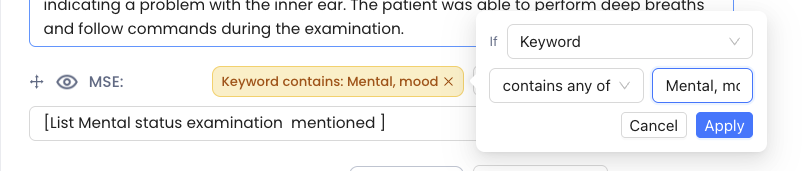
If these topics are relevant, Empathia includes the section in the generated note. If they are not, the section is omitted. This allows one template to support a wider range of visit types while keeping notes focused and relevant.
When to Use "Show When"
Use a Show When condition for content that is not needed in every encounter.
- Keep sections that should always appear unchanged.
- Add Show When to a full section when the entire section is conditional.
- Add Show When to a subsection when only part of a larger section is conditional.
- Use alternate sections when different versions of the same part of the note apply to different encounter types.

How to Write Effective Conditions
A clear Show When condition should describe the circumstances in which you want the section to appear.
Include:
The main topic
Common related terms
Relevant encounter situations
Quick Guide
| Situation | Recommended Setup |
|---|---|
| Section should always appear | No Show When condition |
| Entire section is only sometimes needed | Add Show When to the section |
| Only part of a section varies | Add Show When to the subsection |
| Different versions apply to different encounters | Use alternate sections with separate conditions |
Reach out to support at Support@empathia.ai if you have any issues or need any assistance.
Was this article helpful?
That’s Great!
Thank you for your feedback
Sorry! We couldn't be helpful
Thank you for your feedback
Feedback sent
We appreciate your effort and will try to fix the article